Volume
What is Volume
When we think and talk about volume, we have to understand some fundamental facts. You can measure volume in decibels, which is an absolute unit. However, our perception of volume can be quite different, depending on individual factors like partial deafness, fatigue, habits and preferences.
Example: Two people entering a room, where heavy metal music is playing at around 90 dB.
One person entering was in a crowded room with many people talking very loudly for two hours. Another person comes back from a nap on a bench in the near forest.
Do both people think of the loudness of the music in the same way? Moreover, the second person hates metal music anyway.
Would the effect be the same the other way around?
How do we hear?
The main part of hearing happens in your brain, NOT in your ears. Always keep that in mind. Regardless, both parts need regular rest periods. As a rule of thumb, don’t work on mixing longer than 25-30 minutes.
Where can you make music louder or quieter?
It is important to understand that this can happen in different places. And each place has a different meaning. Let’s go from the ears back to the source of the music.
Ears <- Speakers/Headphones <- AudioInterface <- Software Output <- individual tracks
In each step you can influence the volume going in and out of each step. Today we will talk about the first step between an individual track and the output of your software (Ableton’s master track)
Volume Fader
To mix together multiple tracks you need to add each noise/waveform together.
Like a mathematic additon: 10 + 10 + 10 = 30
This is called SUMMING
By clicking and pulling down the volume fader, you can take away volume.
That is why the scale says -6.0 dB. and the numbers get bigger the quiter the track is.
Master Fader
On the right you have the Master/Main Track which represents the output of ableton which goes to the audio interface.
Important: You can’t send more than 0db out of this track. 0db means 100% of the available volume or capacity. If you send more than 100%, the signal will be clipped and it sounds distorted. The fader indicates this by turning red:
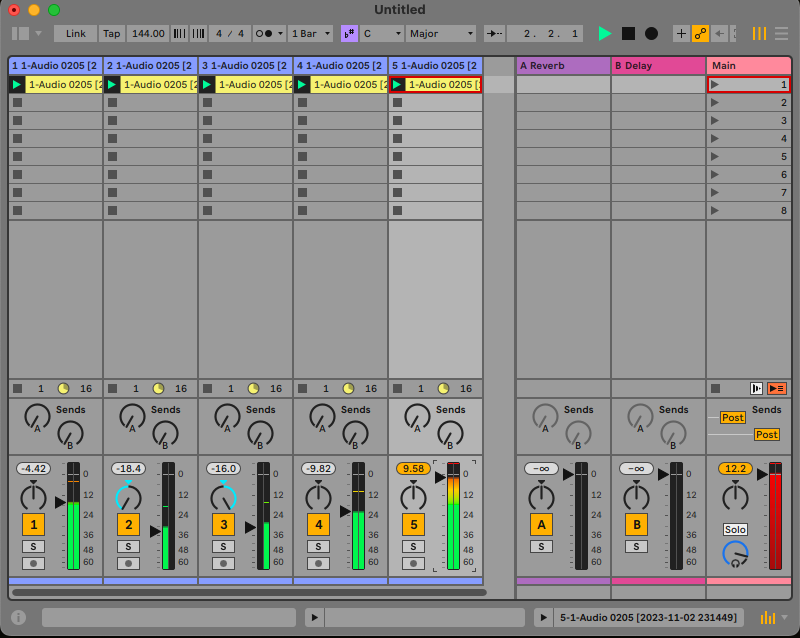
Under all circumstances you absolutely should avoid this. This does not mean that distortion in general is bad. But in that step of the process it is really undesirable.
finding a Balance
When mixing, you have to balance two things at the same time:
- the balance between the individual tracks
- the master volume must not clip
Exercise:
- pick the element(track) you want to be the most important one
- pull down all faders
- pull back up the fader of your main element and leave about -6 to -4 dB headroom on the master
- pull up all other faders until you like the relative volume in relation to the main element
Tips (and more exercises):
- you can change the volume of multiple tracks at once.
- If your master clips, select ALL tracks and pull down everything at once until the master fader is not clipping anymore.
- Alter the volume with your eyes closed to prevent you from “tricking” your brain to hear something, which you might not hear.
- to review a track, remember or write down the volume setting. Pull it down completely and turn it back up, where you think it is right. Compare the volume with what you did earlier.
- pull down the volume of your headphone to a level that you can barely hear it and do the same. compare the volume with the one you wrote down.
- repeat with a higher headphone volume.
- take a rest and listen to a different track and get back to it again.
Panning
There is one more main element to mixing: Panning or in other words: Placement in the stereo field. We usually produce, mix and listen to music in Stereo, which means two completely individual channels. However, this is a vast and deep topic of course, so for today, I want to minimize this to a basic setting. (no pan automation etc.)
There are some rules or best practices when it comes to Pannig:
- Bass-heavy sounds should be on both channels equally (Center)
- similar sounds on different tracks can be placed on opposite sides to “widen” the stereo field
- main elements like melody should not be placed extremly to one side
Keeping those in mind I want you to go through the same process for panning as you went for adjusting the volume. Also take into account, that panning on headphones seems much more dramatic then when played on speakers, as the signal from one headphone side does not reach the other ear, whereas that happens when you listen to two speakers in front of you.