Clip Launchmodes & Quantisation
Launch Modes
In the original documentation this is explained very well:
The Clip Launch Chooser.
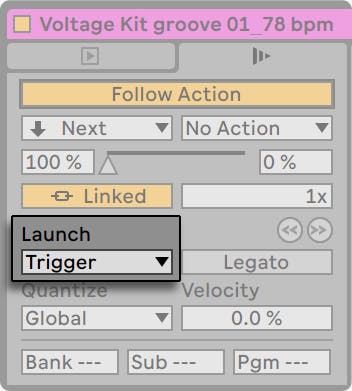 The Launch Mode chooser offers a number of options for how clips behave with respect to mouse clicks, computer keyboard actions or MIDI notes:
- Trigger: down starts the clip; up is ignored.
- Gate: down starts the clip; up stops the clip.
- Toggle: down starts the clip; up is ignored. The clip will stop on the next down.
- Repeat: As long as the mouse switch/key is held, the clip is triggered repeatedly at the clip quantisation rate.
Legato Mode
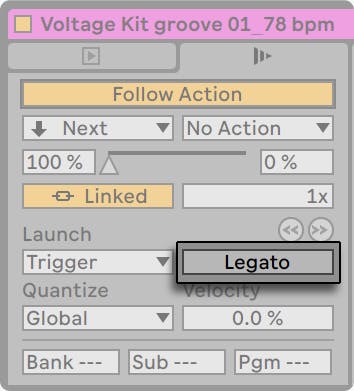 The Legato Mode Switch.
Suppose you have gathered, in one track, a number of looping clips, and you now want to toggle among them without losing the sync. For this you could use a large quantisation setting (one bar or greater), however, this might limit your musical expression.
The Legato Mode Switch.
Suppose you have gathered, in one track, a number of looping clips, and you now want to toggle among them without losing the sync. For this you could use a large quantisation setting (one bar or greater), however, this might limit your musical expression.
Another option, which works even with quantisation turned off, is to engage Legato Mode for the respective clips. When a clip in Legato Mode is launched, it takes over the play position from whatever clip was played in that track before. Hence, you can toggle clips at any moment and rate without ever losing the sync.
Legato Mode is very useful for creating breaks, as you can momentarily play alternative loops and jump back to what was playing in the track before.
Unless all the clips involved play the same sample (differing by clip settings only), you might hear dropouts when launching clips in Legato Mode. This happens because you are unexpectedly jumping to a point in the sample that Live has had no chance to preload from disk in advance. You can remedy this situation by engaging Clip RAM Mode for the clips in question.
Clip Launch Quantisation

The Clip Quantisation chooser lets you adjust an onset timing correction for clip triggering. To disable clip quantisation, choose “None.“
To use the Control Bar’s Global Quantisation setting, choose “Global.“ Global quantisation can be quickly changed using the shortcuts.
Ctrl6, 7, 8, 9, and 0 (Win)
Cmd6, 7, 8, 9, and 0 (Mac)